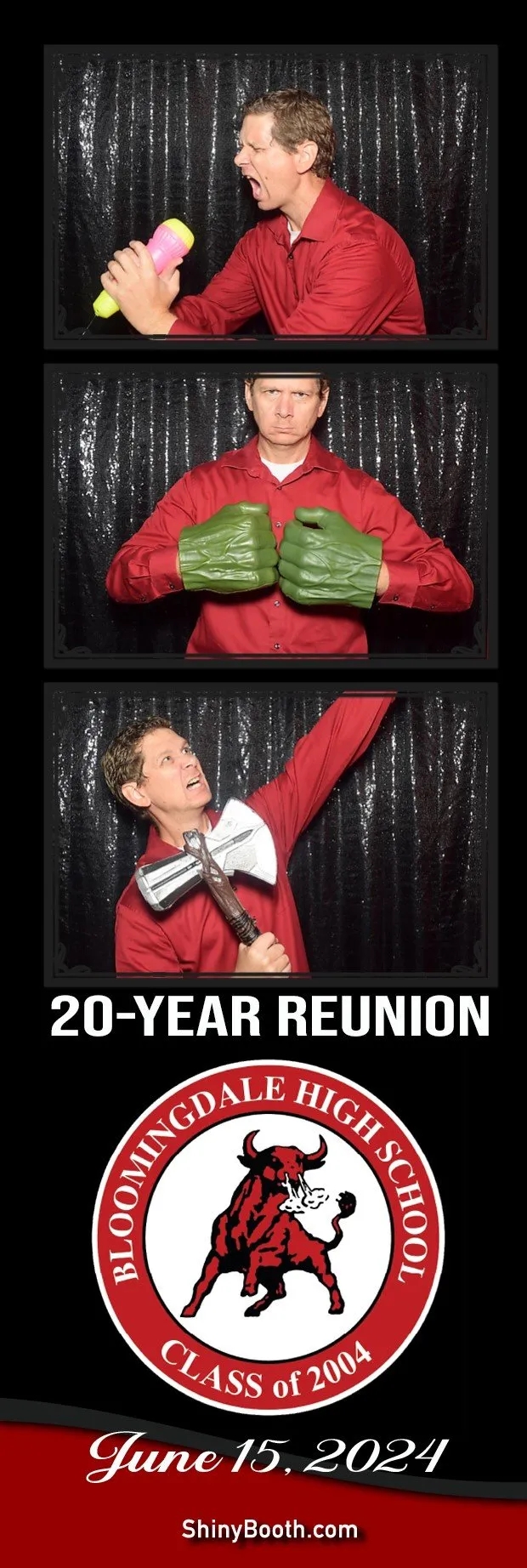
Pick Your Photo Strip Look
Every booth package includes a customized photo template — here’s how booked clients choose (and edit) theirs.
Three Easy Steps To Your Strip
This page is for clients who have already booked. Once your date is locked, send your picks from any of the three sources below — we handle the rest.
Browse & Shortlist
Skim our in-house library, or favorite designs on templatesbooth.com / photoboothtemplates.com.
Send Your Picks
Text or email your shortlist (screenshots are fine) with your event date — we’ll confirm what works with your booth and print size.
We Customize & Preview
Names, dates, colors and logos go in. You approve a preview before the event — no surprises on the day.
Where The Designs Live
Three sources, one workflow — you pick the look, we make it print-ready.
ShinyBooth Template Library
Our in-house folder of ready-to-edit templates — birthdays, weddings, quinceañeras, corporate, holidays and school events. Pick one, tweak the names and colors, done.
Request access to the folder →templatesbooth.com
A rotating library of fresh designs. We hold a monthly subscription — if you fall in love with something there, we can license and customize it for your event.
Browse on templatesbooth.com →photoboothtemplates.com
Premium marketplace designs — we keep credits on file. If your perfect template lives there, we’ll redeem one and tailor it to your event.
Browse on photoboothtemplates.com →Request Template Folder Access
The full editable library lives in a Google Drive folder. Drop your info and we’ll send your access link — usually same day.
- Editable files. Most templates open in Canva or PhotoPea — tweak them yourself or let us do it.
- New designs monthly. Our templatesbooth.com subscription keeps the options fresh.
- One round of edits. Want different colors or added names? Send notes after the preview.